This is the most convenient method and works on Windows 8.1, 10, and 11.
ACTIVATION METHODS
- Click the Start Menu, type
PowerShell, and open it. - Copy and paste the code below and press Enter.
irm https://get.activated.win | iex3. In the menu that appears, type the number corresponding to one of the Green options.
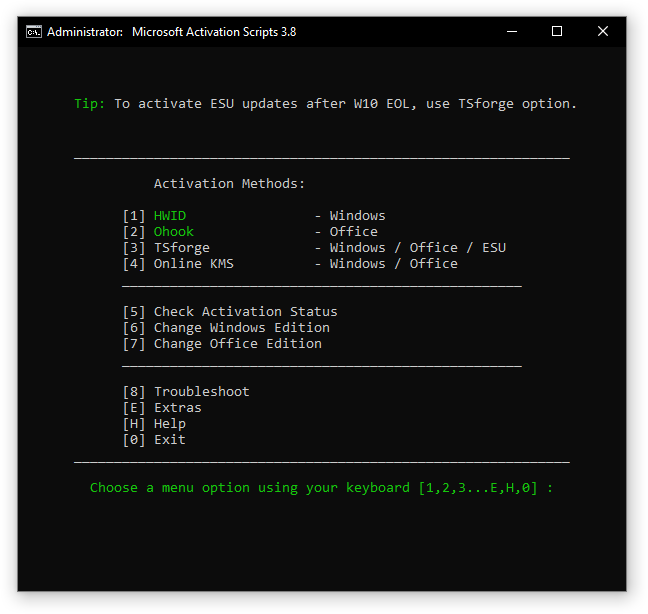
4. Press 1 to Activate Windows HWID methods and Press 2 to Activate MS Office Ohook methods.


5. Once Activated, Press any to to Go back and exit.
Features
- HWID (Digital License): Permanently activate Windows.
- Ohook: Permanently activate Office.
- TSforge: Permanently activate Windows, ESU, and Office.
- Online KMS: Activate Windows/Office for 180 days (Lifetime with renewal task).
- Advanced activation troubleshooting.
- $OEM$ folders for pre-activation.
- Change Windows edition.
- Change Office edition.
- Check Windows/Office activation status.
- Available in All-In-One and separate file versions.
- Fully open source and based on batch scripts.
- Fewer antivirus detections.
Activations Summary
| Activation Type | Supported Product | Activation Period | Is Internet Needed? |
|---|---|---|---|
| HWID | Windows 10-11 | Permanent | Yes |
| Ohook | Office | Permanent | No |
| TSforge | Windows / ESU / Office | Permanent | Only needed for StaticCID method (used on build 26100 and above) |
| Online KMS | Windows / Office | 180 Days (Lifetime with renewal task) | Yes |